


There are many buying guides for personal projects at home.
This is advice I give my friends and colleagues in TV & documentary production.
I’m a freelance producer and editor in New York, working on TV shows and documentaries. On most projects (even before Covid), I usually work remotely with multiple producers, writers, other editors, a GFX person, animator, a sound mixer, composer and a colorist. I deliver to broadcasters, post facilities, Netflix and Amazon. Friends with expensive raid towers or Qnap or Drobo systems tell me stories of Malware (the downside of having internet-connected storage) and disappointment when it turns out their precious box can’t recover after a power failure or drive failure. To me, a good backup strategy involves a combination of traditional hard drives, raid drives and data center storage.
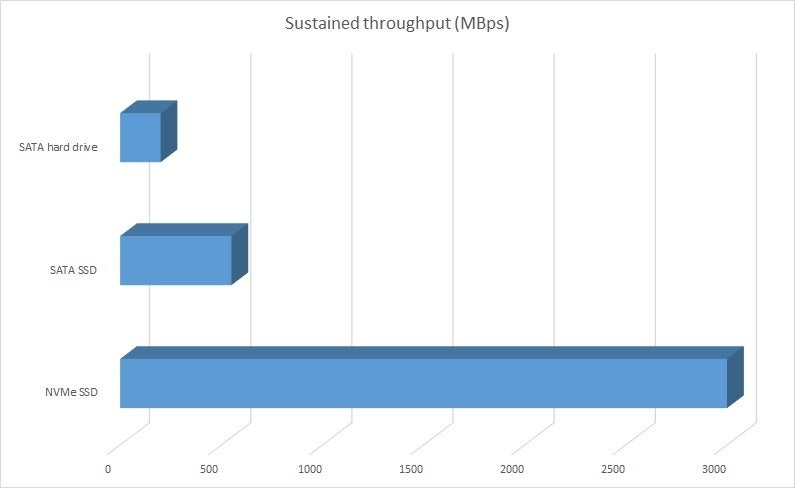
I think because of the normalization of NVMe SSDs in the past two years, everybody should change their storage strategy.
I think media storage must:
A. Be accessible to all users at a fast enough speed for the codecs that are used on the project.
B. Come with a good backup strategy.
A 3-2-1 backup strategy means having at least three total copies of your data, two of which are located locally but on different types of media (like an external hard drive), and at least one copy that is offsite. So, if you have your files on your computer and your hard drive (which you should store separately from your computer when not in use), you need one other copy stored separately from your house.
For most projects, option 1 from the list below, with one of the three longer term storage solutions listed, gives you the best protection against data and time loss.
Use this calculator to calculate your own transfer rates based on your storage and speeds.
1. Editing local with NVMe. 1000 MB/s depending on NVMe >transfer 1TB in 15min.
Most recent computers come with internal NVMe storage. NVMe is insanely fast. My 2019 MacBook Pro does 2500MB/s, a MacPro Tower can reach up to 10,000 MB/s. For most video editing and color correction in 4K, 1000 MB/s is more than enough.
NVMe really changed my thinking about storage. I transfer all the footage for the project to the internal NVMe. Finish the project and then move the data back to a data center or raid drive. If I need a second work station (to conform or color correct) or multiple projects, I copy the footage to a second NVMe. Simply update the metadata (projects) to keep the systems in sync.
The advantage of this workflow is that you are forced to make a few copies of the data on different devices that are not connected to each other. That’s a good backup strategy.
For me, most projects with proxies, consolidated media and master files will fit on a 2TB NVMe.
Cost: $500 per 1TB inside a modern computer (2018 or later) or $500 per 2TB external USB-C NVMe

2. Data centers (100MB/s depending on internet) >transfer 1TB in 2hr
Services like frame.io, LucidLink, Postlab Drive, iconik, BEBOP and Backblaze.
For collaborating with clients and colleagues, sharing, receiving footage and backup during the project’s shoot and post production.
All cloud mounting apps have issues, so they are not a replacement for direct attached storage. I see the disks randomly disconnect, fail to refresh, and just exhibit behavior that makes it generally unusable for anything other than bulk, on-demand tasks. If you have a good internet service you can do it all with one of these solutions. In the near future (2023?) this will work almost like a local hard drive. This kind of service is very stable and reliable and you can trust that the data is well-protected against viruses, corruption and loss. A data center can even restore footage that you deleted a month ago. (happened to me) Studios use data centers, because that gives them more flexibility to work with anyone, anytime, anywhere.
Plan and budget for footage and masters storage after the project wraps to multiple raid 1 systems in different locations. Most data centers offer solutions for delivering your data to you.
Cost: $100-$500/month, You pay for what you use; if you have a lot of projects, rent more space. When you have less work, delete and get charged less. You basically outsource the headache of maintaining a drive system, including backups. If there is a problem, you just hook up another computer and you’re back to work.
3. Raid systems average 250MB/s >transfer 1TB in 1hr
I have decided not to work off raid systems anymore, but I do use them for long-term storage. For me, 250MB/s is just too slow.
I have friends that bought expensive raid 5 or 6 NAS bays and told me they had redundancy, until they had a virus or power surge and all their data was zapped. I learned an expensive lesson: Keep data on multiple systems and drives that are not all connected at the same time. For long-term storage, a simple raid 1 is fine. A raid 1 is a set of two drives that mirror, if one fails you can take the other drive out of the chassis and make a fresh copy. Instead of investing in a 240TB tower, buy multiple smaller 32TB raids that are safely disconnected from the editing systems most of the time.
I use NeoFinder to catalog all my hard drives so that I can search for files on drives that are sitting on the shelf.
Cost: $1000-$10,000 depending on size etc. Example: OWC Thunderbay (buy it empty and add your own drives)
If you buy a raid drive like this, make sure to open it up and put two different drives inside, to reduce the chance that they fail at the same time.
Be a good nerd and look up the latest drive failure rates before buying drives.
Always use a file copy program like Hedge that verifies the copy process. Never copy data by dragging from window to window.
4. NAS at home, speed> 400-1000MB/s >transfer 1TB in 15minutes.
A NAS at home is great for collaborating in a small office and sharing footage.
It is quickly becoming obsolete as gigabit internet becomes more common and data centers become more reliable.
If you want to run a NAS remember to invest time in studying and maintaining the NAS
Cost: $3000-$10,000 depending on size etc. Example: QNAP TVS-872XT
Qnap is better than an old-fashioned raid, because frequently used “hot” data is stored on high-performance SSD tiers, while less-accessed “cold” data is kept on the hard drives.
QNAP can connect to a data center like Backblaze for overnight backups. But, compared to an NVMe it is still annoying that any infrequently used files are slow.